You have a 300-page PDF and a 40-minute commute. Turning that PDF into a podcast sounds like the obvious fix, but the phrase covers two very different things. One is read-aloud: a voice speaks every word, and the audio is as long as the document. The other is a rewrite: the material becomes a script that teaches it. This guide explains how CramClip does the second kind, what the learning research says about it, and how the main PDF to podcast tools compare, including where another tool is the better choice.
What "PDF to podcast" actually means
Three kinds of output go by the same name, and it helps to know which one you want before you pick a tool.
- A narrated PDF, or PDF to audiobook. Text-to-speech reads the document from start to finish. Nothing is left out, which is exactly right for a novel or a contract. For a study guide, it means listening to page numbers, figure captions and the index.
- A one-off AI conversation. Two synthetic hosts discuss your document in a single episode. This is what most people mean today, and it is a great way to get the gist of a report.
- A sequenced audio course. The document is split into lessons that build on each other, each one short enough to finish in one sitting. This is the format built for learning something you will be tested on.
CramClip makes the third kind. If you need every word, a reader app or an audiobook-style tool is the better fit, and we say so in the comparison below.
How CramClip turns a PDF into a podcast, step by step
- UploadA PDF, pasted notes, or a link.
- Outline4 to 20 lessons, one topic each.
- ScriptA Host and an Expert, 15 to 22 minutes.
- Fact-checkNumbers and answers checked against your file.
- AudioTwo voices; lesson 1 in about 90 seconds.
- Quiz and reviewFour questions, then spaced review cards.
1. Upload a PDF, your notes, or a link
You can upload a PDF of up to 300 pages, paste up to 100,000 characters of text, or import a web page. Pasting is the quickest way to turn notes into a podcast if they live in a doc or a notes app. Scanned PDFs are read directly by the model, so there is no separate OCR step, though clear scans work best.
2. The material is mapped into a course
The first pass reads the whole document and builds an outline of 4 to 20 lessons, each covering one coherent topic, ordered from foundations to application. Front matter, tables of contents, indexes and reference lists are skipped. It also works out which exam the material is for, such as NCLEX, PMP, CAPM or AWS, and only asks you to confirm when it is unsure. Anything else runs in a general study mode.
3. Each lesson is written as a conversation
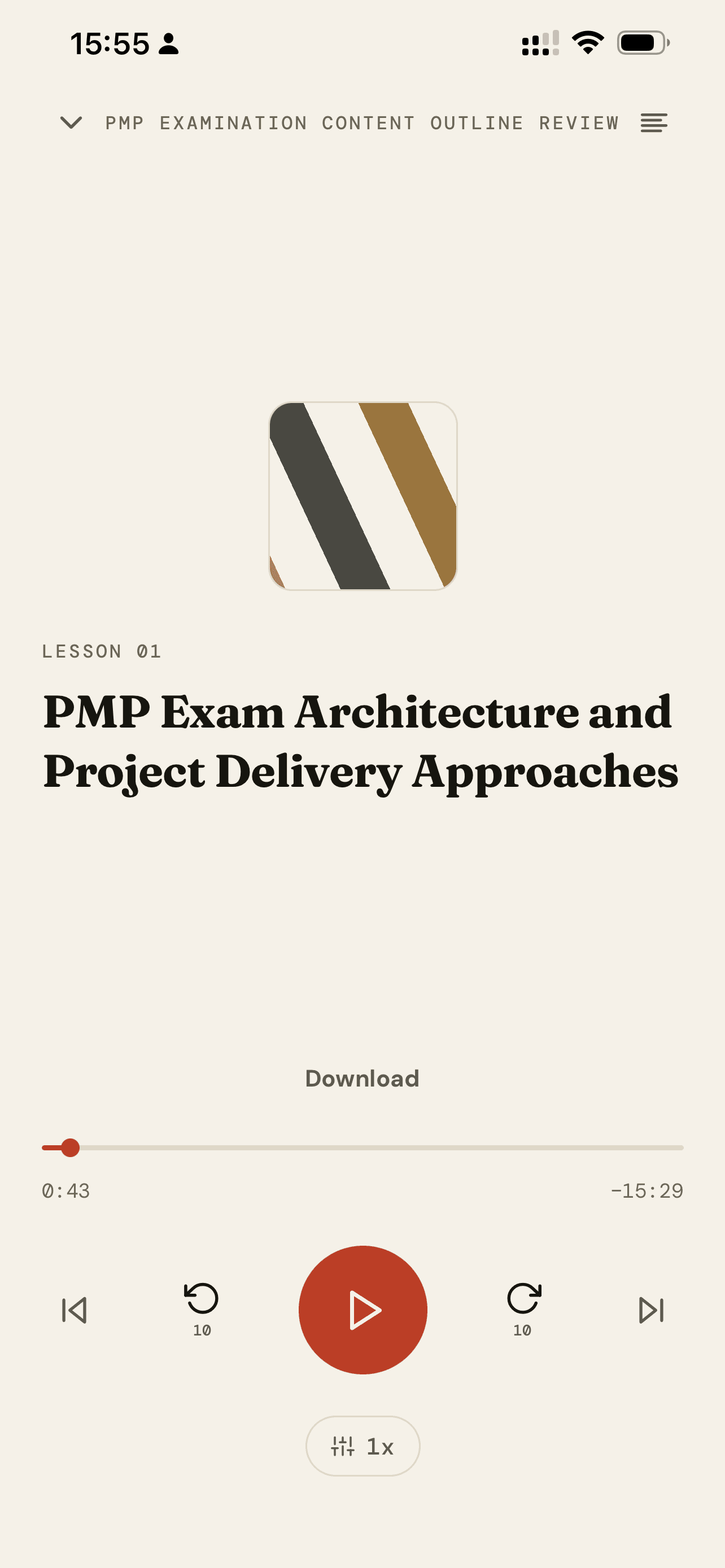
Every lesson is a script for two speakers. The Host asks the questions a learner would ask and keeps things moving; the Expert explains, gives examples and points out how the topic tends to be tested. A lesson runs 2,200 to 3,200 spoken words, or 15 to 22 minutes. It opens with a 30-second preview and closes with exactly three takeaways.
The script is not your PDF read aloud. It keeps the part that does the teaching, roughly a fifth of the original length, and drops what only makes sense on a page, like "see Table 4.2".
4. A fact-check before any audio is made
AI podcasts have a known weak spot: a confident host who gets a number wrong. Google's own help page for Audio Overviews warns that they may contain inaccuracies. CramClip runs a separate review pass on every script before it becomes audio. A second model checks every number, threshold and quiz answer against your source. If something is off, the lesson is corrected once and checked again, and a lesson that still fails is not published.
5. Two voices, with the first lesson in about 90 seconds
The first lesson is generated straight away, so you can start listening in about a minute and a half while the rest of the course is made in the background. The player keeps going with the screen locked, remembers where you stopped and works offline.
6. Quiz, review and a daily plan
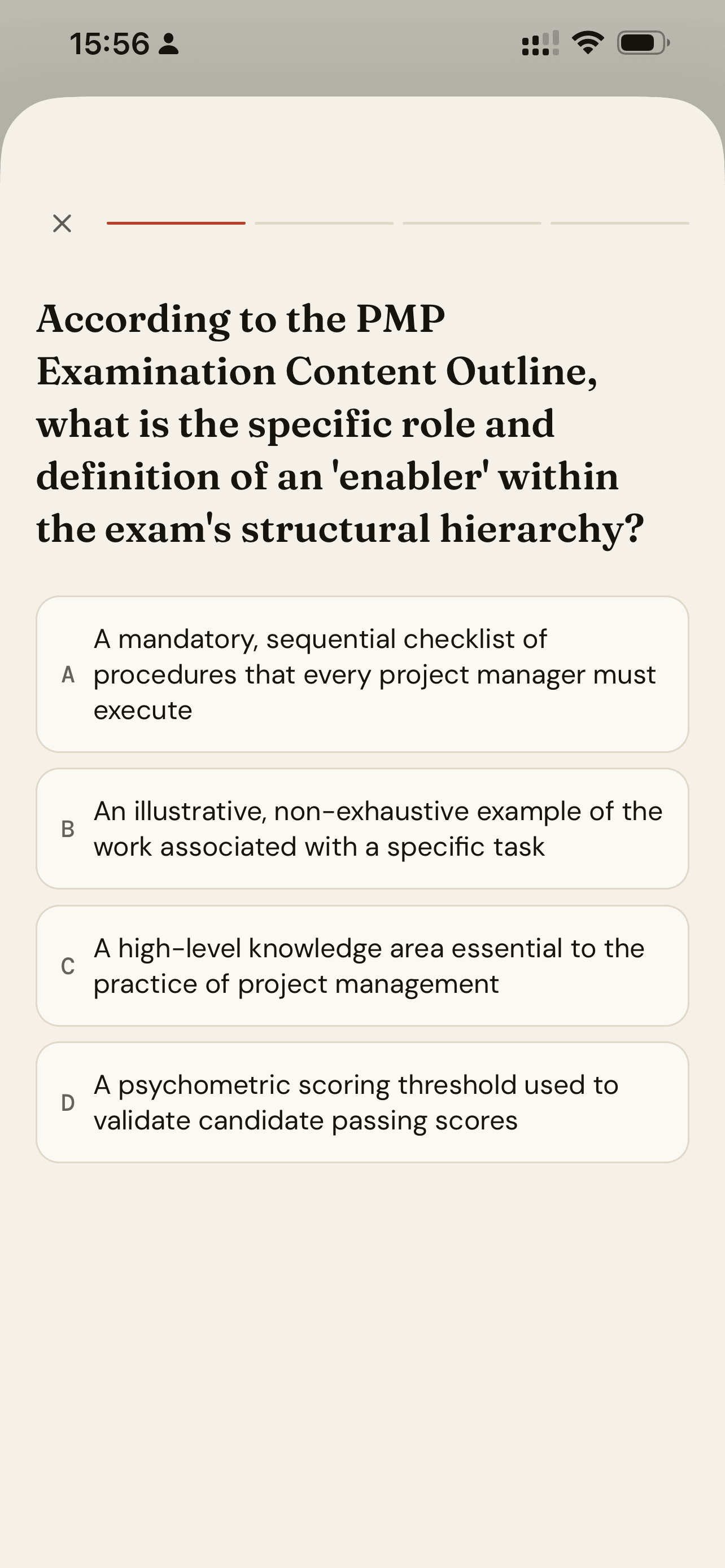
Every lesson ends with four multiple-choice questions, each with an explanation. Anything you miss becomes a review card that comes back one, three, seven and fourteen days later. Set an exam date and the Today screen tells you how many lessons to finish each day.
Why a teaching script beats a read-aloud
Overheard dialogue teaches, especially with good questions
Craig and colleagues compared learners who heard a monologue with learners who overheard a dialogue in which a deep-reasoning question came before each piece of content. Across two experiments, the dialogue group learned more. That is the job the Host does in every lesson: ask the question you would have asked before the answer arrives.
Conversational style helps, in short sessions
A meta-analysis by Ginns, Martin and Marsh found that a conversational, personal style improved both retention and transfer of learning. It also found the benefit faded in sessions longer than about 35 minutes. That finding is one reason CramClip lessons run 15 to 22 minutes rather than an hour.
Smaller pieces are easier to learn
Rey and colleagues pooled 56 studies on segmenting, which means breaking material into learner-sized pieces. They found small-to-medium gains in both retention and transfer, along with lower mental load. A 300-page PDF turned into one long episode ignores that; a course of 4 to 20 lessons follows it.
Listening is legitimate, and testing makes it stick
Is listening as good as reading? A 2022 meta-analysis of 46 studies by Clinton-Lisell found comprehension was about the same on average, with reading slightly ahead when readers set their own pace. So listening is a fair way to learn, not a better one. What moves exam scores is what you do afterwards: practice tests beat rereading (Roediger and Karpicke; Adesope and colleagues), and spaced review beats cramming (Cepeda and colleagues). That is why every CramClip lesson ends in a quiz and feeds a review queue.
PDF to podcast tools compared, fairly
Prices and features below come from each company's own pages as of October 2026. Google renamed NotebookLM to Gemini Notebook in July 2026. For deeper one-to-one comparisons, see our NotebookLM alternative and Speechify alternative guides.
| Tool | What you get | Format control | Study features | Starts at |
|---|---|---|---|---|
| Gemini Notebook (formerly NotebookLM) | One AI conversation per request; Deep Dive, Brief, Critique or Debate | Shorter, default or longer; custom focus; 80+ languages | Quizzes and flashcards | Free, with paid Google AI plans |
| Adobe Acrobat | A two-host conversation with a transcript | Highlights or deep dive; up to 600 pages | None specific to exams | Acrobat AI Assistant after limited free use |
| ElevenLabs GenFM | A host-and-guest conversation or one-host bulletin | Editable transcript before audio | None specific to exams | Paid ElevenLabs plan |
| Speechify AI Podcasts | Conversational, lecture or debate formats | Several formats | Read-aloud of the full text too | Premium, $29/month or $139/year |
| Wondercraft | An edited podcast with music, ready to publish | Script editing, voice choice, timeline | None; built for creators | Paid plans |
| CramClip | A course of 4 to 20 lessons | Exam-aware outline and pacing | Quiz per lesson, spaced review, exam countdown | First lesson free; Pro from $8.99/week |
Which one should you use?
- Gemini Notebook is the best general-purpose free option, especially if you are working across several sources or in a language other than English.
- Acrobat makes sense if you already live in it and want a quick summary of a long document.
- ElevenLabs wins on voice quality and lets you edit the script before audio is made.
- Wondercraft is the pick if you are publishing a real podcast for an audience.
- Speechify suits you if what you mostly want is to hear the full text, with a podcast now and then.
- CramClip is built for one situation: an exam with a date, material in English, an iPhone, and a need for a structured course with quizzes and review rather than a single episode.
CramClip has limits worth knowing: it works in English only, it is on iOS for now with Android coming, each upload becomes one course, and the audio is for your own study, not for publishing.
How to turn a PDF into a podcast that is worth listening to
Whatever tool you choose, a few habits make the result better:
- Use text PDFs when you can. Scans work, but clean text is read more reliably.
- Remove answer keys if you want the quizzes to test you honestly.
- Split very large files by topic. A focused document gives a focused outline.
- Check high-stakes numbers against the source, whichever tool you use.
- Listen at a speed you can follow, then raise it once the vocabulary is familiar.
Frequently asked questions
Can I turn a PDF into a podcast for free?
Yes. Gemini Notebook's Audio Overviews are free within Google's usage limits. CramClip's first lesson is free in full, including its quiz and review cards.
Is a PDF to podcast the same as a PDF to audiobook?
No. An audiobook-style reader speaks every word and runs as long as the document. A PDF to podcast tool rewrites the material as a conversation, which is shorter and easier to follow but does not include every sentence.
How long is each episode?
Each CramClip lesson runs 15 to 22 minutes, and a course has 4 to 20 lessons depending on the material. In other tools, length depends on the format you choose.
Does it work with scanned PDFs?
Yes. CramClip reads scanned pages directly without a separate OCR step. Clear, upright scans give the best results.
Can I turn my own notes into a podcast?
Yes. Upload them as a PDF, or paste up to 100,000 characters of text, and they become a course like any other document.
Sources
- Craig, S. D., Sullins, J., Witherspoon, A., & Gholson, B. (2006). The deep-level-reasoning-question effect. Cognition and Instruction, 24(4), 565–591.
- Ginns, P., Martin, A. J., & Marsh, H. W. (2013). Designing instructional text in a conversational style: A meta-analysis. Educational Psychology Review, 25(4), 445–472.
- Rey, G. D., et al. (2019). A meta-analysis of the segmenting effect. Educational Psychology Review, 31(2), 389–419.
- Clinton-Lisell, V. (2022). Listening ears or reading eyes: A meta-analysis of reading and listening comprehension comparisons. Review of Educational Research, 92(4), 543–582.
- Roediger, H. L., & Karpicke, J. D. (2006). Test-enhanced learning. Psychological Science, 17(3), 249–255.
- Adesope, O. O., Trevisan, D. A., & Sundararajan, N. (2017). Rethinking the use of tests: A meta-analysis of practice testing. Review of Educational Research, 87(3), 659–701.
- Cepeda, N. J., et al. (2006). Distributed practice in verbal recall tasks. Psychological Bulletin, 132(3), 354–380.
- Google. Introducing Gemini Notebook and Audio Overviews help.
- Adobe. Turn documents into podcasts with Acrobat.
- ElevenLabs. How to use GenFM.
- Speechify. Pricing.
- Wondercraft. PDF to podcast generator.