If you searched for NotebookLM lately, you may have noticed it has a new name. Since July 16, 2026, Google calls it Gemini Notebook (formerly NotebookLM), and it is still one of the best free research tools around. This page is for one narrower job: passing an exam with a date on it, using your own PDFs, mostly by listening. For that job, a NotebookLM alternative built as a course can fit better. For many other jobs, Gemini Notebook is the better pick, and we say where. Every Google fact below comes from Google's own help and blog pages as of October 2026.
What NotebookLM Audio Overviews can do in October 2026
Most articles about NotebookLM Audio Overviews were written before the rename and before Google added formats and length controls. Here is the current picture, from Google's Audio Overviews help page.
Four formats
- Deep Dive is the default: two hosts unpack your sources and connect the ideas.
- The Brief is a single speaker giving the key points in under two minutes.
- The Critique has two hosts give constructive feedback on material such as an essay or a design doc.
- The Debate has two hosts argue different perspectives in a formal back-and-forth.
Length, language and focus
You can choose Shorter, Default or Longer. Google does not publish minute counts for these, and Longer is available in English only. Audio Overviews come in more than 80 languages and default to the language of your Google Account. You can also type a prompt to focus the hosts on certain topics or pitch the conversation at a particular level.
Interactive mode and mobile
Interactive mode lets you join the conversation and ask the hosts a question; they answer from your sources and then carry on. It is English only, works on newly generated overviews, and Google warns about delays and glitches. The mobile app runs on Android and iOS, plays in the background and can save an overview for offline listening inside the app. Google's help page notes that on mobile the audio cannot be downloaded as a file to your device.
The newer study tools
In September 2026, Google announced more study features: interactive learning overviews that combine summaries with quizzes and flashcards, new quiz formats such as short answer and fill in the blank, the option to ask chat about your quiz results, a lecture recorder on mobile, and real-time voice conversations with a notebook, rolling out to Ultra subscribers first. That is a serious set of study tools, and it is improving quickly.
Google is also clear about one limit: Audio Overviews "may contain inaccuracies or audio glitches." That is true of every AI audio tool, including ours.
Where Gemini Notebook is the better choice
Not every search for a NotebookLM alternative should end in switching. Be honest with yourself about the job. If any of the following describes it, Gemini Notebook is probably the right tool.
- You want it free. The free tier includes Audio Overviews, and paid Google AI plans raise the limits.
- You work across many sources. A free notebook holds up to 50 sources; AI Pro raises that to 300.
- You study in a language other than English. 80+ languages for audio, against CramClip's English only.
- You are not on an iPhone. Gemini Notebook runs on the web, Android and iOS.
- You want to talk back. Interactive mode and voice conversations have no CramClip equivalent.
- You are writing, not testing. The Critique and Debate formats suit essays and research better than a course does.
Free
AI Plus
AI Pro
AI Ultra (20 TB)
AI Ultra (30 TB)
Google does not publish a daily Audio Overview count on its limits page, so we do not print one. Its plans page says AI Pro gets "5x more Audio Overviews" than the free tier. US college students can also claim a free year of Google AI Pro if they redeem it by December 31, 2026.
When a NotebookLM alternative built for exams makes sense
The difference is not the voices. It is what happens before and after you press play.
A sequence, not an episode
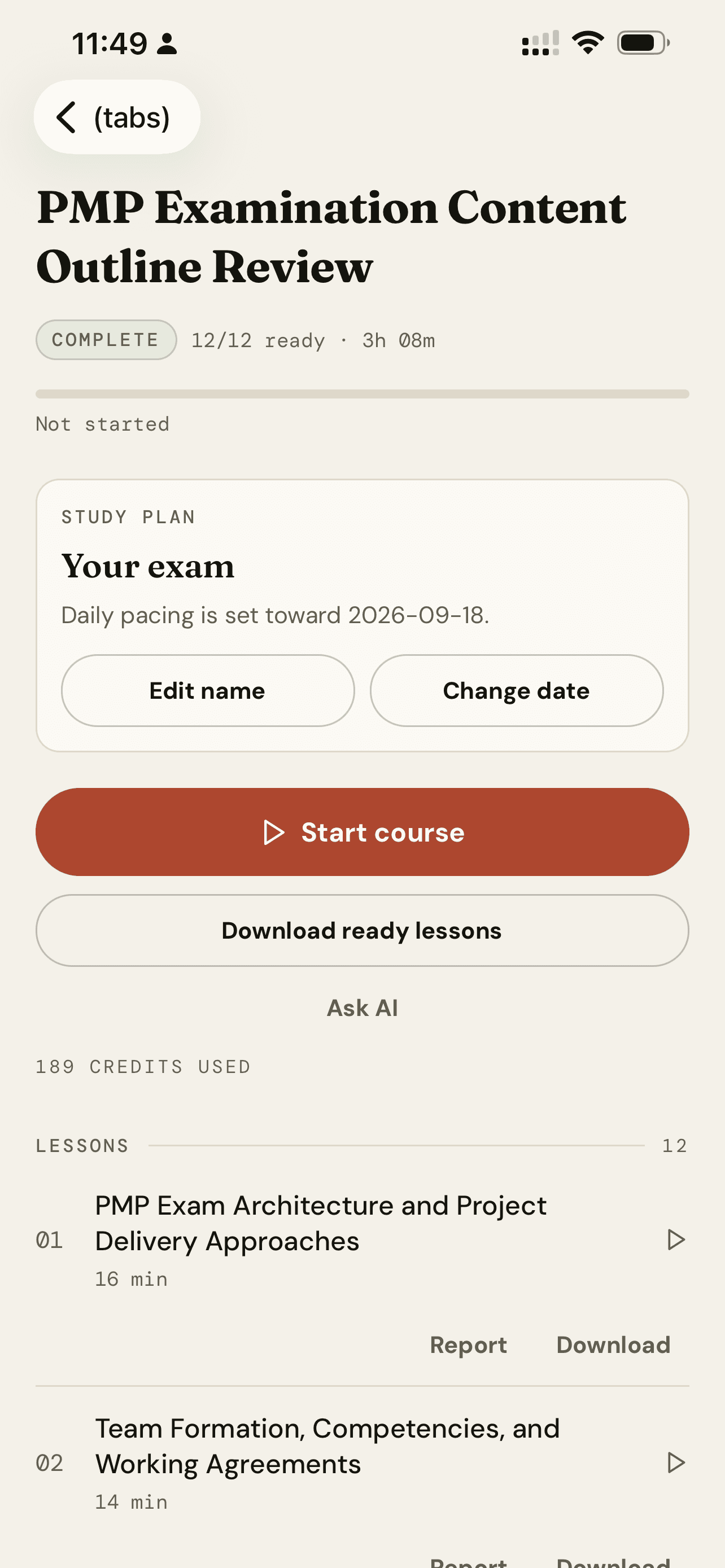
Each Audio Overview is one conversation per request. That is the main reason students look for a NotebookLM alternative when the material is long. CramClip reads your whole PDF once and maps it into a course of 4 to 20 lessons, ordered from foundations to application. Each lesson runs 15 to 22 minutes, opens with a 30-second preview and ends with three takeaways. Before any paid generation starts, you see the lesson count, total minutes and credits.
Built around the exam
When CramClip reads your file, it works out which exam the material is for, such as NCLEX, PMP, CAPM or AWS. When it is confident, the lessons point out how a topic tends to be tested. When it is unsure, it asks you, and anything else runs in a general study mode. If you are preparing for the PMP, our guide to the PMP exam content outline shows what that weighting looks like.
The loop after listening
Gemini Notebook has quizzes and flashcards too, so the difference here is scheduling. (If flashcards are your main tool, see our Quizlet alternatives guide.) Every CramClip lesson ends with four multiple-choice questions. Anything you miss becomes a review card that returns one, three, seven and fourteen days later; a miss sends it back to day one. That design follows two well-tested findings: practice tests beat rereading (Roediger and Karpicke, 2006), and spaced sessions beat massed ones (Cepeda and colleagues, 2006). Listening on its own is closer to rereading, which is why the quiz matters.
- ListenOne 15 to 22 minute lesson.
- QuizFour questions with explanations.
- ReviewMisses return on day 1, 3, 7 and 14.
- PlanLessons left divided by days left.
A plan that counts down
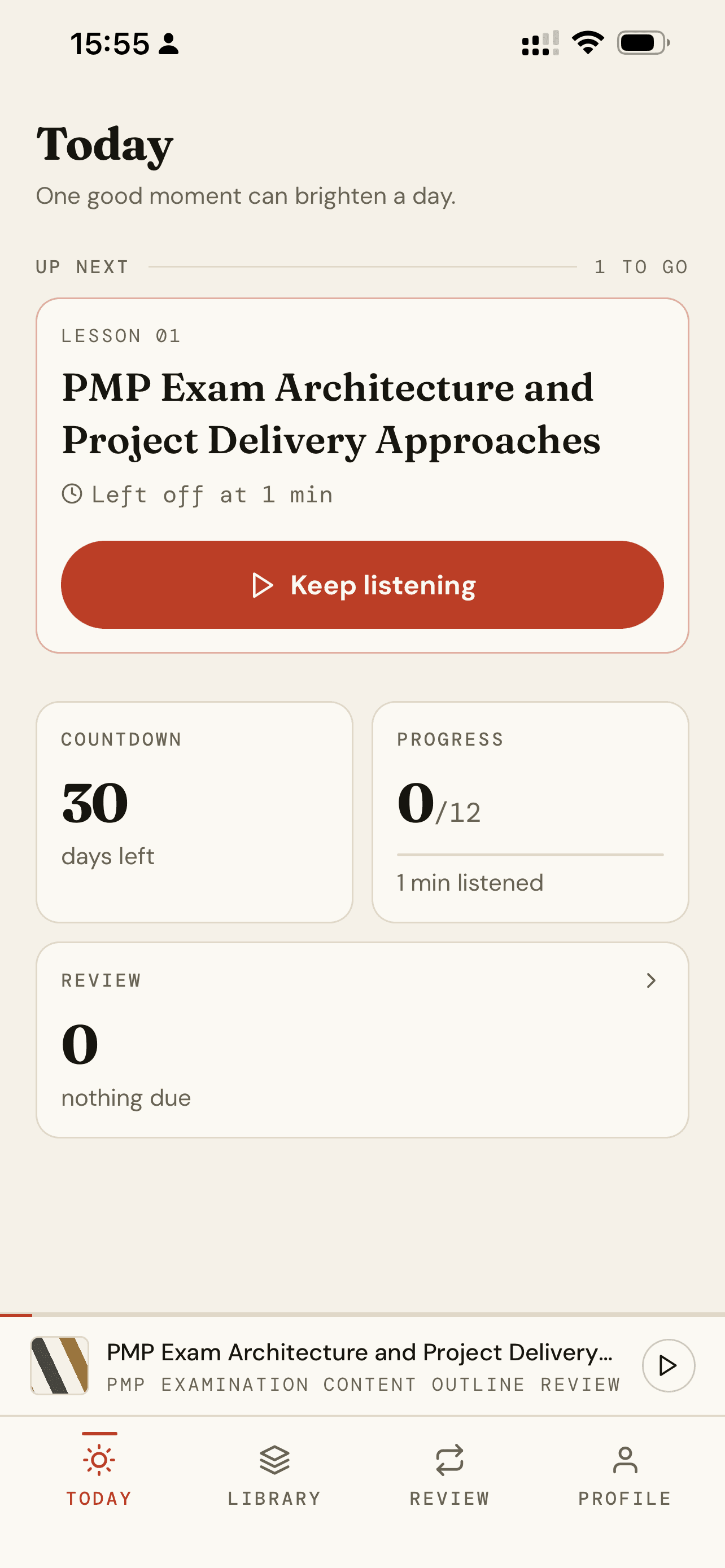
Set an exam date and the Today screen divides the lessons you have left by the days you have left, and recalculates as you go. With no date, it suggests one lesson a day plus whatever review is due.
A fact-check before audio
Before a lesson becomes audio, a second model checks its numbers, thresholds and quiz answers against your PDF, and a lesson that fails is corrected and checked again. This reduces errors; it does not eliminate them, so check high-stakes numbers against the source either way.
Gemini Notebook vs CramClip, side by side
If you are weighing CramClip as a NotebookLM alternative, this is the summary. Google facts are from Google's help, blog and plans pages as of October 2026.
| Gemini Notebook (formerly NotebookLM) | CramClip | |
|---|---|---|
| Price to start | Free; paid Google AI plans from $4.99/month | First lesson free; Pro $8.99/week, $17.99/month or $119.99/year |
| Output | One Audio Overview per request | A course of 4 to 20 lessons |
| Length control | Shorter, Default, Longer | 15 to 22 minutes per lesson, set by the material |
| Languages | 80+ | English only |
| Sources | Up to 50 per notebook free, 300 on AI Pro | One PDF (up to 300 pages), pasted text or a link per course |
| Talk to the hosts | Interactive mode (English, beta) | No |
| Quizzes and flashcards | Yes | Four-question quiz per lesson |
| Spaced review schedule | Not documented | Missed questions return on day 1, 3, 7 and 14 |
| Exam countdown and daily plan | Not documented | Yes |
| Offline | In-app download; no file export on mobile | Download lessons or whole courses |
| Platforms | Web, Android, iOS | iOS (Android coming) |
| Source check before audio | Not documented | Yes |
How to test any NotebookLM alternative with the same PDF
Feature tables only go so far when you judge a NotebookLM alternative. The fair test is to give two tools the same file and compare what you can actually learn from the result. We have not published results yet, so here is the method, fixed in advance, that you can run yourself.
Pick the files. Use two or three public, license-clean PDFs that look like real exam material: a project management study guide excerpt, a public cloud whitepaper, and an openly licensed nursing chapter.
Run each tool twice. First with default settings. Then with each tool's best effort: for Gemini Notebook, a Deep Dive at Longer length with a focus prompt naming the exam; for CramClip, the default course.
Score blind. Two raters score each output separately, without knowing which tool made it, and average where they disagree.
| Criterion | How to measure it |
|---|---|
| Time to first audio | Stopwatch from upload complete to play |
| Total audio | Sum of episode or lesson lengths, in minutes |
| Coverage | Share of the PDF's top-level headings discussed in substance |
| Factual errors | Numbers or claims that contradict the PDF, checked against the source |
| Exam relevance | 1 to 5: does it flag what is likely to be tested? |
| Structure | Is there a preview and a recap? |
| After listening | Quiz items available, and is review scheduled? |
| Retention | A 10-question quiz taken 48 hours later by at least five listeners |
| Cost | Plan price needed to cover the whole PDF |
If you run this yourself, write down the settings you used. Small changes, such as a focus prompt, can shift the results a lot.
Using both: a practical workflow
You do not have to choose one. For exam prep, the most useful NotebookLM alternative is often a second tool, not a replacement. Use Gemini Notebook to explore: pull lecture notes, articles and practice material into a notebook and ask questions across all of them. Then take the one PDF that defines your exam, such as the official outline or your program's review guide, and turn it into a CramClip course for the commute, with the quiz and review loop running alongside. If you are new to the idea, our guide to turning a PDF into a podcast compares more tools.
Frequently asked questions
Is NotebookLM still free?
Yes. Gemini Notebook, formerly NotebookLM, has a free tier that includes Audio Overviews. Google AI Plus, Pro and Ultra plans raise the limits.
Did NotebookLM change its name?
Yes. Google renamed it Gemini Notebook on July 16, 2026. It is the same standalone product, and existing notebooks carry over.
How long is a NotebookLM Audio Overview?
Google offers Shorter, Default and Longer options but does not publish exact minutes. The Brief format is under two minutes.
Can NotebookLM make quizzes and flashcards?
Yes. What Google does not document is a spaced review schedule or a daily plan tied to an exam date, which is the gap a course-style NotebookLM alternative fills.
Does CramClip support other languages or Android?
Not yet. CramClip works in English only and is available on iOS, with Android coming.
Sources
- Google. NotebookLM is now Gemini Notebook (July 2026).
- Google. Audio Overviews help.
- Google. Gemini Notebook limits.
- Google. Gemini Notebook mobile app help.
- Google. New study tools in Gemini Notebook (September 2026).
- Google. Google AI plans.
- Roediger, H. L., & Karpicke, J. D. (2006). Test-enhanced learning. Psychological Science, 17(3), 249–255.
- Cepeda, N. J., et al. (2006). Distributed practice in verbal recall tasks. Psychological Bulletin, 132(3), 354–380.